
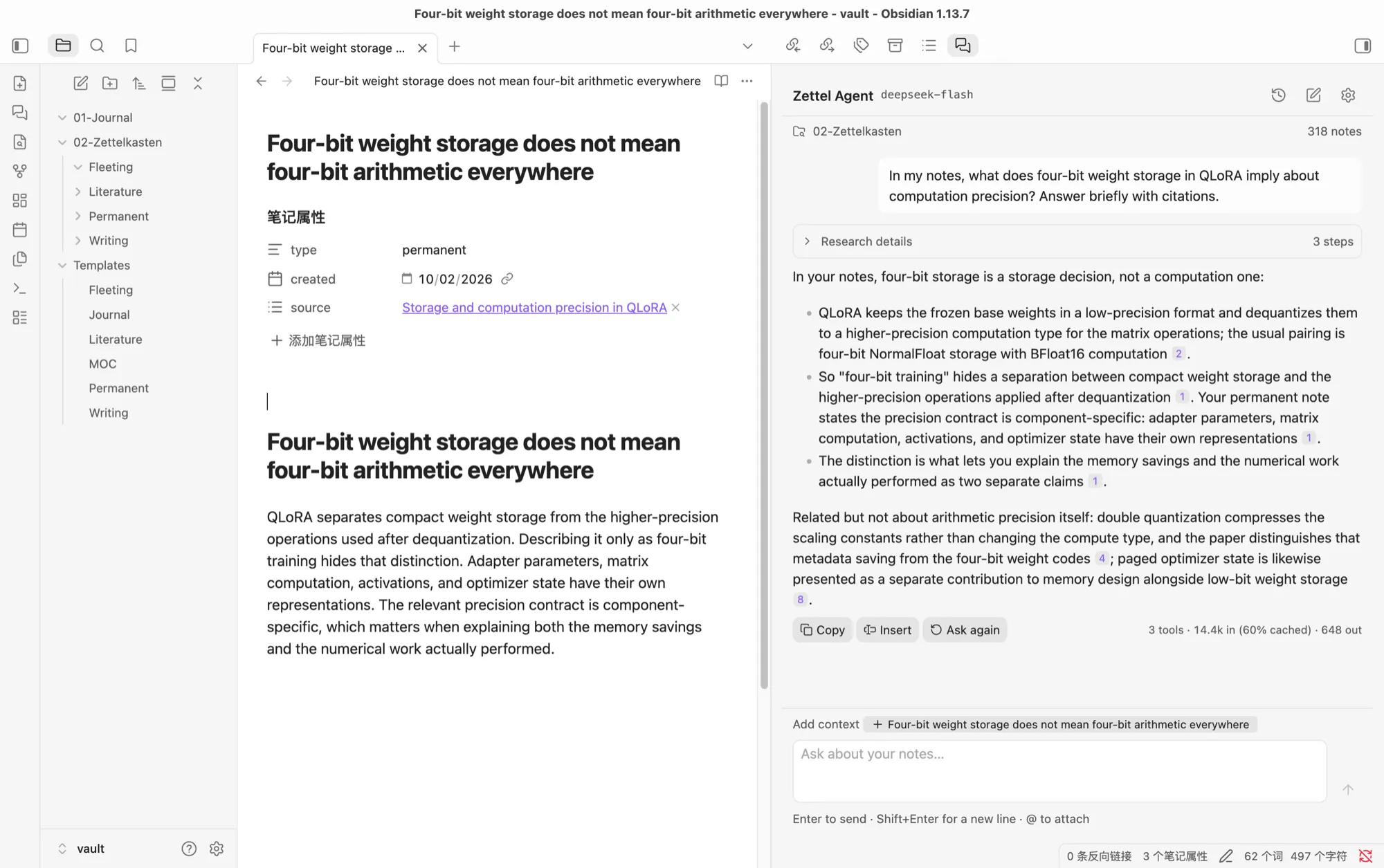
What it is
Zettel Agent is a chat pane in Obsidian’s sidebar. You ask a question about your notes, and an agent searches, reads and follows links across your Zettelkasten. Then it answers with citations that open the exact section each claim came from.
It is built for writing from a Zettelkasten, where finding a phrase is the easy part. The real work is gathering everything you wrote on an idea, comparing what different sources claim, and seeing which connections exist and which are missing. Typical questions:
- What do my notes say about paged optimizers?
- How does QLoRA’s paging differ from PagedAttention?
- What links to my note on reward models, and what is still missing?
Features
It researches, not just retrieves
A RAG pipeline runs one search and hopes the answer is in the results. Zettel Agent lets the model decide what to do next, with five read-only tools:
searchranks note sections by keyword, with an index that weighs titles, aliases, tags and headings above body text.matchfinds exact phrases and shows the surrounding lines.readopens a whole note, one heading, or the next page of a long section.linksfollows incoming and outgoing links up to two hops away.listsurveys notes by stage, folder, tag or link status.
The agent rephrases, reads further and follows links until it has enough evidence. Every step is kept under a folded Research details panel, so you can see exactly what it searched and read.
Every claim points back to a note
Each excerpt the agent reads gets an evidence ID tied to that note’s content. The answer cites those IDs inline, and each one becomes a chip. Hover to see the note and heading; click to jump to the section. If a citation points at text the agent never actually read, or at a note that has changed since, the plugin flags it.
It never touches your notes
The agent has no way to write to your vault. Text reaches a note only when you choose to:
- Copy or Insert the answer, with citations turned into
[[path#heading]]links. - Create a fleeting, literature or permanent note from a fixed template, with no model involved.
Notes are treated as data, so instructions hidden inside a note are never followed.
A chat that fits how you work
- Type
@to attach any note, or add the open note or your selection with one click. - Chats are saved. Reopen one and its citations still work, and follow-up questions keep the full context.
- Ask again retries the last question. Esc stops a running answer.
Your model, your key
Pick DeepSeek (the default), Anthropic Claude or OpenAI, and use your own API key. Keys stay in Obsidian’s secure storage, never in the plugin’s settings file.
Bilingual, with optional local search
Keyword search handles both English and Chinese text. If you run Ollama, you can turn on local hybrid search, which adds semantic matching for paraphrased and cross-language questions. Embeddings are computed and cached on your own machine, and if Ollama is unavailable the plugin says so and falls back to keyword search.
How it’s built
- Its own agent loop. One provider-neutral loop sits behind adapters for the Claude Messages API, OpenAI Responses and DeepSeek Chat Completions. Every turn has a hard budget, and the last request is reserved for the answer, so a long research turn still ends with one.
- A plain TypeScript core. Retrieval, the agent loop and chat sessions never import Obsidian, so they run and are tested in Node.
- Record and replay. A session’s model traffic can be recorded and replayed later through the real SDKs, loop and tools with no network. I use it to test against real model output without paying for every run.
What’s next
- Writing commands such as
/link,/critique,/gapsand/outline. - A persistent index for faster startup on large vaults.
- A GitHub Release and submission to Obsidian’s community plugins.